Here is something that happens to millions of Xfinity customers every single day:
You get a new device. You try to connect to your home Wi-Fi. Your screen asks for a Comcast network security key — and you have absolutely no idea where to find it.
Sound familiar?
You are not alone. The Comcast network security key — also called your Xfinity Wi-Fi password, wireless security key, or network passphrase — is one of the most searched topics among Xfinity internet customers in 2026.
The good news is finding your Comcast network security key is easier than you think — and fixing it when it is not working is even simpler once you know exactly where to look.
At FutureCyber.it we have put together the most complete and up-to-date guide to your Comcast network security key — covering exactly where to find it, how to reset it, why it stops working, and how to fix every common problem in minutes.
Let us get straight into it.
Table of Contents
What Is the Comcast Network Security Key?
Your Comcast network security key is simply your Xfinity Wi-Fi password. It is the combination of letters, numbers, and symbols that protects your home wireless network from unauthorised access.
When any device — laptop, phone, tablet, smart TV, or printer — asks you to enter a network security key it is asking for your Xfinity Wi-Fi password.
Here is a quick reference table so you never get confused by the terminology again:
| Term | Means the Same Thing? |
|---|---|
| Comcast network security key | ✅ Yes — your Xfinity Wi-Fi password |
| Xfinity network security key | ✅ Yes — same thing |
| Network security key | ✅ Yes — same thing |
| Wi-Fi password | ✅ Yes — same thing |
| Wireless security key | ✅ Yes — same thing |
| Network passphrase | ✅ Yes — same thing |
| Comcast security key code | ✅ Yes — same thing |
| WPA key | ✅ Yes — technical name |
💡 FutureCyber.it Quick Answer: Is the network security key the same as the password? Yes — 100%. Your Comcast network security key and your Xfinity Wi-Fi password are the exact same thing. Windows calls it a network security key while most devices call it a Wi-Fi password.
Where Is the Comcast Network Security Key Located?
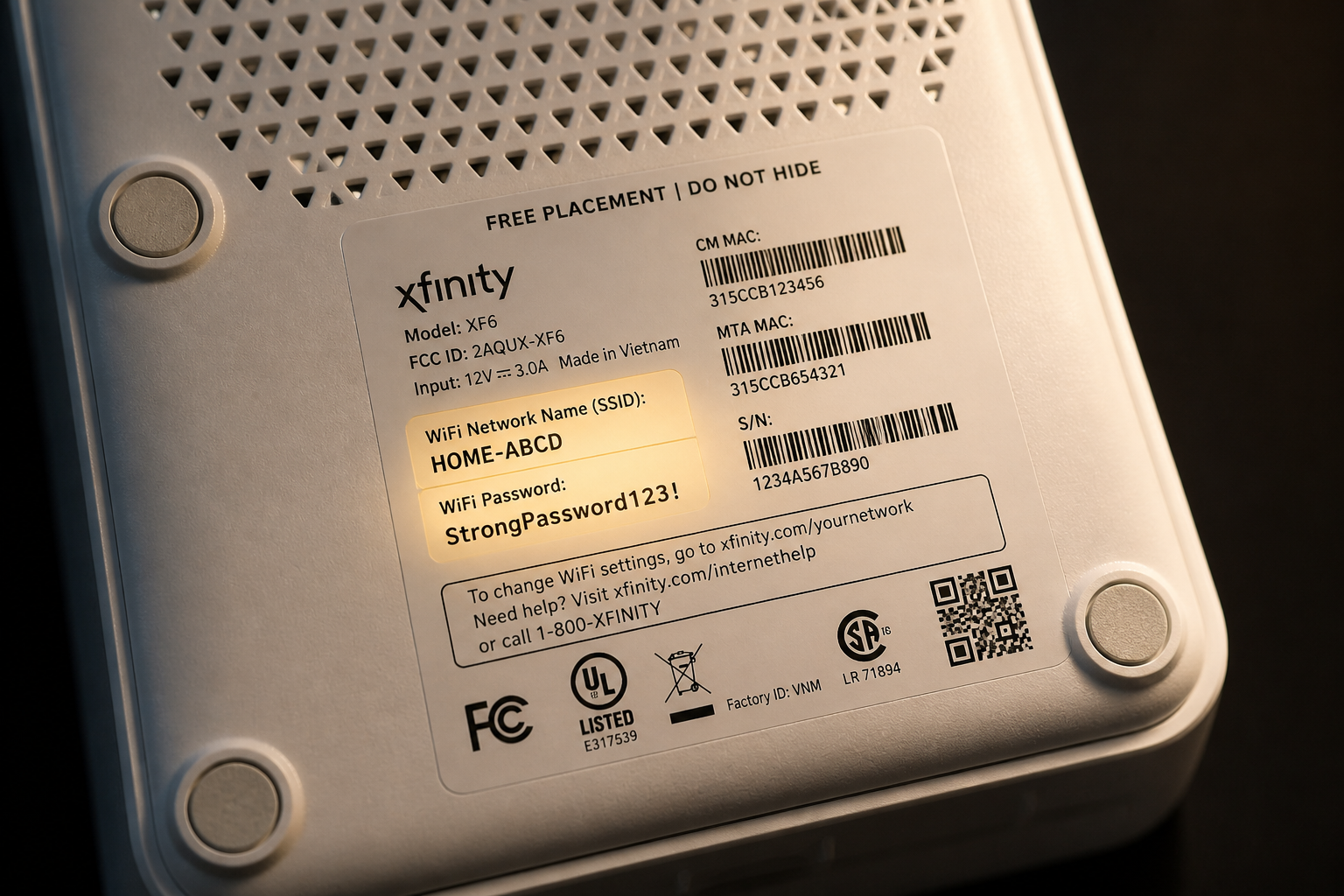
The fastest way to find your Comcast network security key location is to check your Xfinity Gateway router directly. Here is exactly where to look:
Method 1 — Check the Router Label (Fastest Method)
Your Comcast router network security key is printed on a sticker on your Xfinity Gateway. Here is exactly where to find it:
| Router Location | What to Look For |
|---|---|
| Bottom of router | Most common location |
| Back of router | Second most common |
| Side of router | Some models |
| Label colour | Usually white or silver sticker |
| Label name | “WiFi Password” “Security Key” or “WPA Key” |
What your Comcast network security key looks like on the label:
| Label Field | Example |
|---|---|
| Network Name (SSID) | HOME-XXXX-2.4G or HOME-XXXX-5G |
| Comcast network security key | xFiS7K9mP2nQ4rL8 |
| Security Type | WPA2 or WPA3 |
⚠️ Important: If you have changed your Comcast network security key after initial setup the label will show the OLD default password — not your new one. Skip to Method 2 or 3 for your current password.
7 Powerful Ways to Find Your Comcast Network Security Key
Here are all 7 methods for finding your Comcast network security key — from the fastest to the most comprehensive:
Method 1 — Router Label (30 Seconds)
As described above — flip your Xfinity Gateway over and look for the sticker. Your Comcast network security key is labelled as WiFi Password or WPA Key. This is your default password and works if you have never changed it.
Method 2 — Xfinity App (2 Minutes)
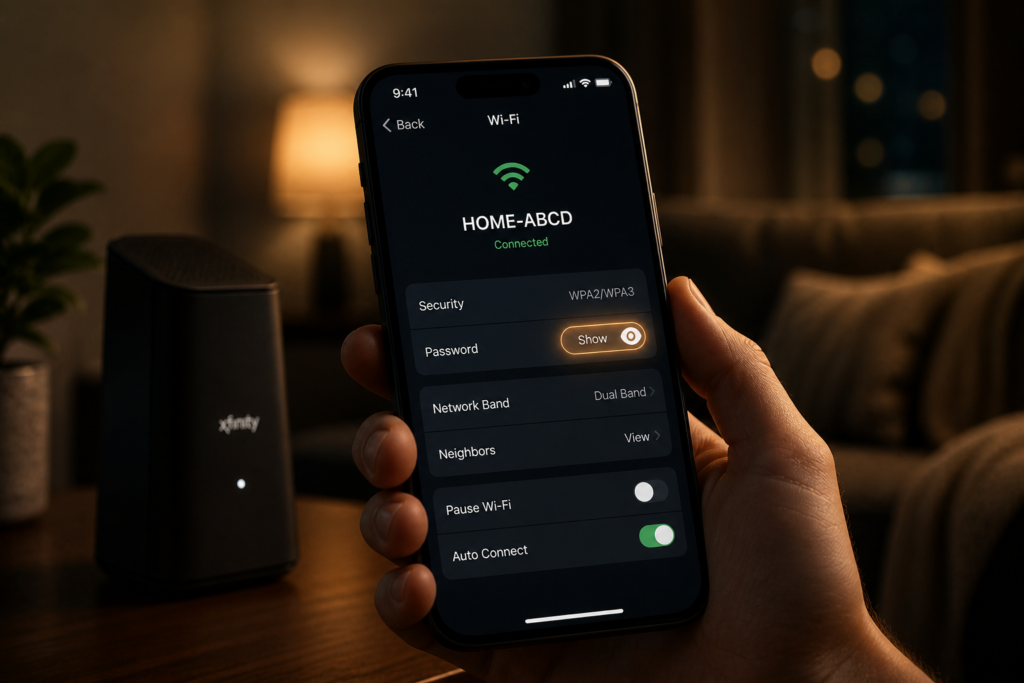
The Xfinity app is the easiest way to find your Comcast network security key on your phone:
| Step | Action |
|---|---|
| 1 | Download the Xfinity app from App Store or Google Play |
| 2 | Log in with your Xfinity account credentials |
| 3 | Tap WiFi at the bottom of the screen |
| 4 | Tap See Network |
| 5 | Tap Edit WiFi |
| 6 | Your Comcast network security key appears — tap the eye icon to reveal it |
Method 3 — Xfinity Website (3 Minutes)
You can find your Xfinity network security key directly through your account online:
| Step | Action |
|---|---|
| 1 | Go to xfinity.com/myaccount |
| 2 | Log in with your Xfinity username and password |
| 3 | Click Internet |
| 4 | Click WiFi credentials |
| 5 | Click Show password |
| 6 | Your Comcast network security key is now visible |
Method 4 — Xfinity Gateway Admin Panel (5 Minutes)
You can access your Comcast router network security key directly through the router admin panel:
| Step | Action |
|---|---|
| 1 | Connect to your Xfinity Wi-Fi network on any device |
| 2 | Open browser and go to 10.0.0.1 or 192.168.0.1 |
| 3 | Log in — default username is admin password is password |
| 4 | Click Gateway then Connection then Wi-Fi |
| 5 | Click Edit next to your network name |
| 6 | Your Comcast network security key is shown in the Security Key field |
Method 5 — Windows PC Already Connected (2 Minutes)
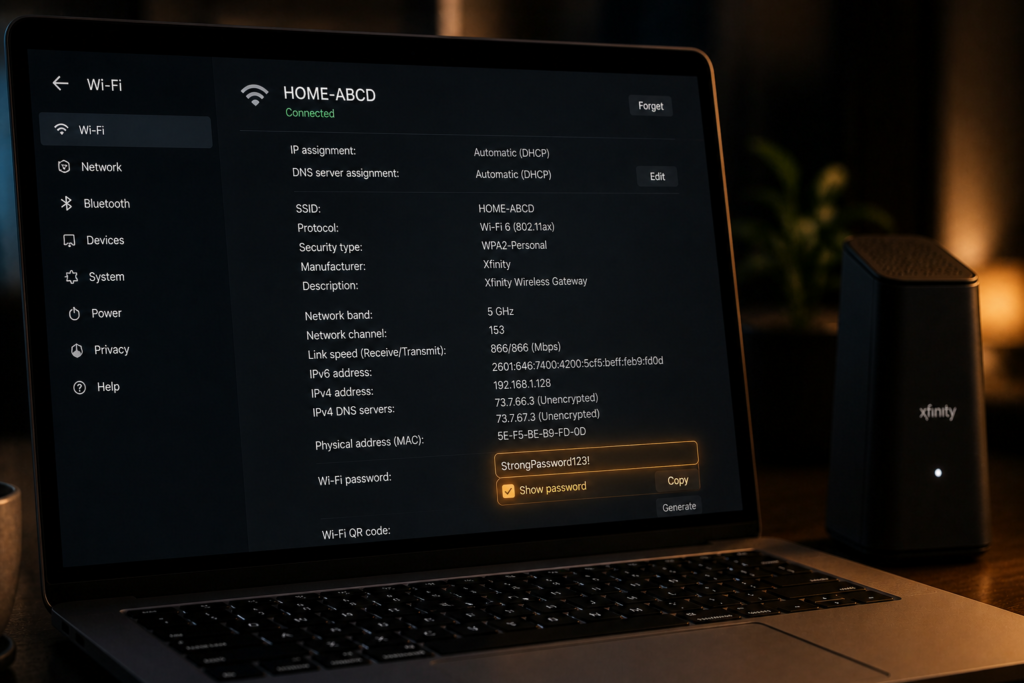
If your Windows PC is already connected to your Xfinity Wi-Fi you can reveal your Comcast network security key without any router access:
| Step | Action |
|---|---|
| 1 | Click the Wi-Fi icon in taskbar bottom right |
| 2 | Click Network & Internet Settings |
| 3 | Click Change adapter options |
| 4 | Right-click your Wi-Fi network → Status |
| 5 | Click Wireless Properties |
| 6 | Click Security tab |
| 7 | Check Show characters — your Comcast network security key appears |
Alternative Windows Command Prompt Method:
Open Command Prompt as Administrator and type:
netsh wlan show profile name="YourXfinityNetworkName" key=clearLook for Key Content — that is your Comcast network security key.
Method 6 — Find Network Security Key on Phone (Android and iPhone)
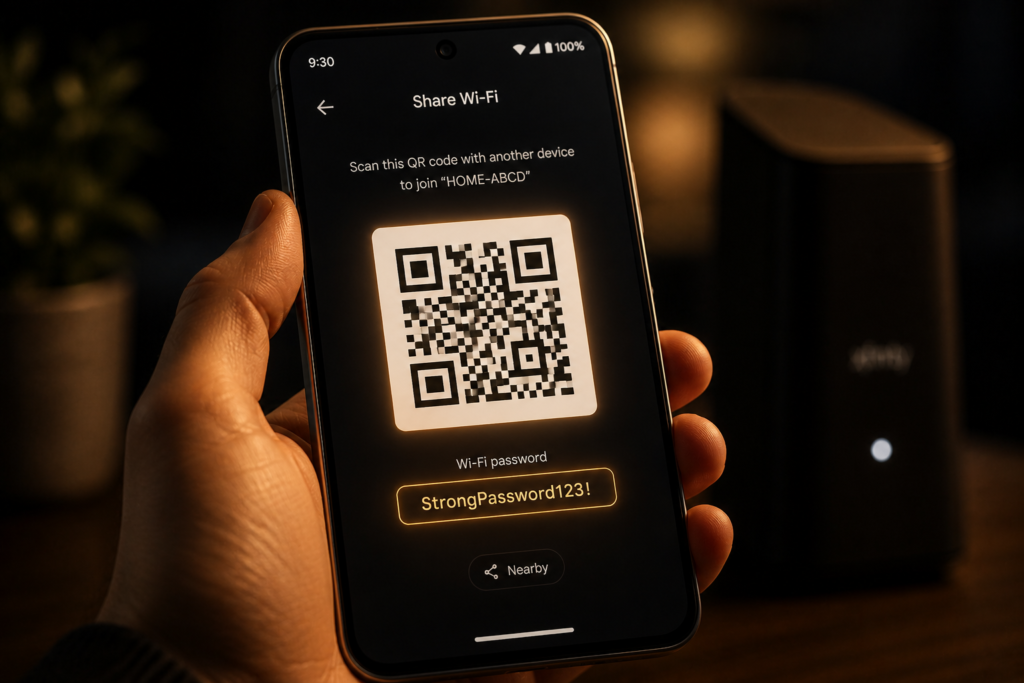
Finding your Comcast network security key on Android:
| Step | Action |
|---|---|
| 1 | Go to Settings |
| 2 | Tap Wi-Fi or Connections |
| 3 | Tap your connected Xfinity network |
| 4 | Tap Share or QR Code |
| 5 | Verify with fingerprint or PIN |
| 6 | Your Comcast network security key appears below the QR code |
Finding your Comcast network security key on iPhone (iOS 16+):
| Step | Action |
|---|---|
| 1 | Go to Settings |
| 2 | Tap Wi-Fi |
| 3 | Tap the info icon (i) next to your Xfinity network |
| 4 | Tap Password |
| 5 | Authenticate with Face ID or Touch ID |
| 6 | Your Comcast network security key is revealed |
Method 7 — Call Xfinity Support (Last Resort)
If none of the above methods work you can contact Xfinity support directly:
| Support Option | Contact |
|---|---|
| Phone | 1-800-XFINITY (1-800-934-6489) |
| Live Chat | xfinity.com → Support → Chat |
| Xfinity Store | Find your nearest store at xfinity.com/stores |
| Xfinity App | Chat support available 24/7 |
How to Find Network Security Key on Comcast Router — All Models
Different Xfinity Gateway models have slightly different label locations. Here is your complete guide by model:
| Xfinity Gateway Model | Label Location | Default Key Label |
|---|---|---|
| XB8 Gateway | Bottom sticker | WiFi Password |
| XB7 Gateway | Bottom sticker | WiFi Password |
| XB6 Gateway | Bottom sticker | Security Key |
| XB3 Gateway | Back panel | WPA Key |
| Technicolor Gateway | Back panel | Wireless Key |
| Arris Gateway | Bottom sticker | WPA2 Password |
| Cisco Gateway | Bottom sticker | WiFi Password |
💡 FutureCyber.it Pro Tip: Not sure which Xfinity Gateway model you have? Check the model number on the same label as your Comcast network security key — it starts with XB followed by a number.
Comcast Network Security Key Not Working — 7 Fixes
The Comcast network security key not working problem is one of the most frustrating issues Xfinity customers face. Here are the 7 most powerful fixes:
Fix 1 — Check Caps Lock and Special Characters
The most common reason your Xfinity network security key not working is simple typing errors.
| Common Typing Error | Fix |
|---|---|
| Caps Lock on | Turn off Caps Lock — passwords are case sensitive |
| Zero vs letter O | Check if your key uses 0 (zero) or O (letter) |
| Special characters | Copy-paste the key instead of typing manually |
| Spaces | Some keys have no spaces — remove any accidental spaces |
Fix 2 — Confirm You Are Using the Right Network Name
Your Xfinity Gateway broadcasts multiple networks — make sure you are connecting to the correct one.
| Network Type | Name Example | Frequency |
|---|---|---|
| Main 2.4GHz | HOME-XXXX-2.4G | Longer range, slower |
| Main 5GHz | HOME-XXXX-5G | Shorter range, faster |
| Xfinity WiFi | xfinitywifi | Public hotspot — different password |
⚠️ Critical: The public xfinitywifi hotspot network uses completely different credentials from your home Comcast network security key. Never confuse these two networks.
Fix 3 — Reset Your Comcast Network Security Key
If your Comcast network security key is not working and you cannot remember your current password a reset is your best option:
How to Reset Your Comcast Network Security Key:
| Method | Steps |
|---|---|
| Via Xfinity App | App → WiFi → Edit WiFi → Change Password → Save |
| Via xfinity.com | My Account → Internet → WiFi Credentials → Change |
| Via Admin Panel | 10.0.0.1 → Gateway → Wi-Fi → Edit → Change Security Key |
| Factory Reset | Hold reset button on router for 30 seconds — restores default Comcast security key code |
⚠️ Warning: A factory reset will restore your Comcast network security key to the default printed on the router label — but it will also disconnect all devices and reset all your custom settings.
Fix 4 — Restart Your Xfinity Gateway
A simple restart fixes the Comcast network security key not working issue surprisingly often:
| Step | Action |
|---|---|
| 1 | Unplug your Xfinity Gateway from power |
| 2 | Wait 60 full seconds |
| 3 | Plug back in |
| 4 | Wait 2 minutes for full restart |
| 5 | Try connecting again with your Comcast network security key |
Fix 5 — Check for Xfinity Service Outage
Sometimes the Xfinity network security key not working issue is caused by a service outage rather than a password problem.
| How to Check | Method |
|---|---|
| Xfinity App | App → Account → Service Status |
| Xfinity Status Centre | xfinity.com/support/status |
| Text OUTAGE | Text to 266278 from your mobile |
| Downdetector | downdetector.com/status/xfinity |
Fix 6 — Update Your Device Network Drivers
Sometimes the Comcast network security key not working problem is on your device not your router.
| Device | Fix |
|---|---|
| Windows PC | Device Manager → Network Adapters → Update Driver |
| Mac | System Preferences → Software Update |
| Android | Settings → Software Update → Check for Updates |
| iPhone | Settings → General → Software Update |
Fix 7 — Forget Network and Reconnect
If your device has saved an old incorrect Comcast network security key forgetting the network and reconnecting fresh often fixes the problem:
| Device | How to Forget Network |
|---|---|
| Windows | Settings → Wi-Fi → Manage Known Networks → Forget |
| Mac | System Preferences → Network → Wi-Fi → Advanced → Remove |
| iPhone | Settings → Wi-Fi → Info icon → Forget This Network |
| Android | Settings → Wi-Fi → Hold network name → Forget |
Comcast Network Security Key Reset — Complete Guide
If you need to completely reset your Comcast network security key here is the full step by step guide for every method:
Reset via Xfinity App (Recommended)
| Step | Action |
|---|---|
| 1 | Open Xfinity app |
| 2 | Tap WiFi |
| 3 | Tap See Network |
| 4 | Tap Edit WiFi |
| 5 | Delete old Comcast network security key |
| 6 | Type new strong password — minimum 8 characters |
| 7 | Tap Save |
| 8 | Reconnect all devices with new Comcast network security key |
What Makes a Strong Comcast Network Security Key?
| Requirement | Example |
|---|---|
| Minimum 12 characters | Longer is always better |
| Mix of character types | Uppercase lowercase numbers symbols |
| No personal information | Not your name address or birthday |
| No dictionary words | Avoid “password” or “xfinity123” |
| Unique | Never reuse a password from another account |
| Strength | Example | Safe? |
|---|---|---|
| Very Weak | xfinity123 | ❌ Never use |
| Weak | MyHome2026 | ⚠️ Avoid |
| Strong | BlueSky#99!Wifi | ✅ Good |
| Very Strong | Xk9#mP2$qL7@nR4! | ✅ Excellent |
How to Find My Comcast Network Security Key — Quick Reference
Here is the fastest reference guide for every situation:
| Your Situation | Best Method | Time Needed |
|---|---|---|
| Never changed password | Check router label | 30 seconds |
| Changed password — have phone | Xfinity app | 2 minutes |
| Changed password — have computer | Windows network settings | 2 minutes |
| Changed password — iPhone | Settings → Wi-Fi → Password | 1 minute |
| Changed password — Android | Settings → Wi-Fi → Share | 1 minute |
| No access to any device | Xfinity website login | 3 minutes |
| Cannot log into Xfinity account | Router admin panel 10.0.0.1 | 5 minutes |
| Forgot everything | Factory reset router | 10 minutes |
| Need help | Call 1-800-XFINITY | 10-15 minutes |
What Is the Network Security Key for Xfinity — Explained Simply
Your Xfinity network security key is the digital lock protecting your home internet. Here is why it matters for your cybersecurity:
| Security Aspect | Why Your Comcast Network Security Key Matters |
|---|---|
| Prevents unauthorised access | Stops neighbours and strangers using your internet |
| Protects personal data | Keeps your browsing activity private |
| Prevents bandwidth theft | Stops others slowing your connection |
| Blocks network attacks | Prevents hackers entering your home network |
| Protects all devices | Every device on your network stays safe |
| Legal protection | Prevents others committing crimes on your network |
💡 FutureCyber.it Security Tip: Change your Comcast network security key every 6 months and always use a strong unique password with at least 12 characters including uppercase lowercase numbers and symbols. This single habit dramatically improves your home network security.
Comcast Network Security Code vs Network Security Key — What Is the Difference?
Many Xfinity customers get confused between these terms. Here is the simple answer:
| Term | What It Is |
|---|---|
| Comcast network security key | Your Wi-Fi password |
| Comcast security key code | Same thing — just a different name |
| Comcast network security code | Same thing — just a different name |
| WPA key | Technical name for the same password |
| Xfinity account password | Different — this is your login to xfinity.com |
| Xfinity PIN | Different — this is your account security PIN |
⚠️ Do not confuse your Comcast network security key with your Xfinity account password. They are two completely separate passwords for two completely different things.
People Also Search
Q: How do I find my Comcast network security key? A: You can find your Comcast network security key in 6 ways — check the sticker on the bottom or back of your Xfinity Gateway router labelled WiFi Password or WPA Key, use the Xfinity app under WiFi → See Network → Edit WiFi, log into xfinity.com → My Account → Internet → WiFi Credentials, access your router admin panel at 10.0.0.1, check your Windows network settings if your PC is already connected, or find it on your phone under Wi-Fi settings.
Q: Where to find the network security key on a Comcast router? A: The network security key on a Comcast router is printed on a sticker on the bottom or back of your Xfinity Gateway. Look for a label that says WiFi Password, WPA Key, Security Key, or Wireless Key. The key is usually a random combination of letters and numbers like xFiS7K9mP2nQ4rL8. If you have changed it since setup the label shows the old default — use the Xfinity app or xfinity.com to find your current password.
Q: Why is my Xfinity network security key not working? A: Your Xfinity network security key not working is usually caused by one of these issues — Caps Lock is on making your password case incorrect, you are entering the default password but have already changed it, you are connecting to the wrong network (xfinitywifi public hotspot instead of your home network), your device has saved an old incorrect password, or there is an Xfinity service outage. Fix by checking Caps Lock, confirming your network name, forgetting and reconnecting to the network, or resetting your password via the Xfinity app.
Q: How do I reset my Comcast network security key? A: To reset your Comcast network security key open the Xfinity app → tap WiFi → See Network → Edit WiFi → delete the old password → enter a new strong password → tap Save. You can also reset it at xfinity.com → My Account → Internet → WiFi Credentials → Change, or through your router admin panel at 10.0.0.1. For a full factory reset hold the reset button on your Xfinity Gateway for 30 seconds — this restores the default Comcast security key code printed on the router label.
Q: Is the network security key the same as the Wi-Fi password? A: Yes — the network security key is the same as the Wi-Fi password. Your Comcast network security key, Xfinity Wi-Fi password, WPA key, wireless security key, and network passphrase all refer to exactly the same thing. Windows uses the technical term network security key while most smartphones and routers simply call it a Wi-Fi password or wireless password.
Q: Where is the network security key located on my Xfinity Gateway? A: The network security key location on your Xfinity Gateway is on a sticker on the bottom or back of the router. Look for labels saying WiFi Password, WPA Key, Security Key, or Wireless Key. Different models have different label positions — XB8 and XB7 gateways have the label on the bottom while older models like XB3 have it on the back panel.
Q: Where to find the network security key on my phone for Xfinity? A: To find the network security key on your phone for Xfinity — on Android go to Settings → Wi-Fi → tap your Xfinity network → Share → verify with fingerprint or PIN and the key appears below the QR code. On iPhone running iOS 16 or later go to Settings → Wi-Fi → tap the info icon next to your Xfinity network → tap Password → authenticate with Face ID or Touch ID.
Q: What is my Comcast network security key if I forgot it? A: If you forgot your Comcast network security key check the router label for the default password, use the Xfinity app under WiFi settings to reveal the current password, log into xfinity.com → My Account → Internet → WiFi Credentials, or access your router admin panel at 10.0.0.1. If all else fails perform a factory reset by holding the reset button for 30 seconds — this restores the default Comcast security key code shown on the router sticker.
Q: How do I find my network security key for Xfinity on Windows? A: To find your Xfinity network security key on Windows — click the Wi-Fi icon in the taskbar → Network & Internet Settings → Change adapter options → right-click your Wi-Fi network → Status → Wireless Properties → Security tab → check Show characters. Your Comcast network security key appears in the Network security key field. Alternatively open Command Prompt as Administrator and type: netsh wlan show profile name=”YourNetworkName” key=clear and look for Key Content.
FAQ
Q: What is the Comcast network security key?
The Comcast network security key is your Xfinity Wi-Fi password — the combination of letters numbers and symbols that protects your home wireless network from unauthorised access. It is printed on the sticker on the bottom or back of your Xfinity Gateway router and can also be found through the Xfinity app or at xfinity.com. It is also called the Xfinity network security key, WPA key, wireless security key, or Comcast security key code.
Q: Where is the Comcast network security key location?
The Comcast network security key location is on a sticker on the bottom or back of your Xfinity Gateway router labelled WiFi Password or WPA Key. If you have changed the default password you can find your current Comcast network security key through the Xfinity app, at xfinity.com/myaccount, through your router admin panel at 10.0.0.1, or through your device’s saved Wi-Fi settings.
Q: Why is my Comcast network security key not working?
Your Comcast network security key not working is most commonly caused by Caps Lock being on, entering the default password when you have already changed it, connecting to the wrong Xfinity network, a saved old password on your device, or a temporary Xfinity service outage. Fix by checking capitalisation, confirming your network name, forgetting the network and reconnecting, or resetting your Comcast network security key through the Xfinity app.
Q: How do I reset my Comcast network security key?
Reset your Comcast network security key through the Xfinity app under WiFi → Edit WiFi → change password → Save, or at xfinity.com → Internet → WiFi Credentials → Change. For a complete factory reset hold the reset button on your Xfinity Gateway for 30 seconds which restores the default Comcast security key code on the router label. Always choose a strong new password with at least 12 characters.
Q: Is the network security key the same as the password for Comcast?
Yes — your Comcast network security key and your Xfinity Wi-Fi password are exactly the same thing. Windows uses the technical term network security key while Xfinity and most devices call it a Wi-Fi password. The Comcast network security code and Comcast security key code also refer to the same password printed on your router label.
Q: Where to find the network security key on a Comcast router?
Find the network security key on a Comcast router by looking at the sticker on the bottom or back of your Xfinity Gateway. It is labelled WiFi Password, WPA Key, Security Key, or Wireless Key depending on your model. XB8 and XB7 gateways have the sticker on the bottom while older XB3 models have it on the back panel.
Q: How do I find my network security key for Xfinity on my phone?
On Android find your Xfinity network security key by going to Settings → Wi-Fi → tap your network → Share → verify identity and the key appears below the QR code. On iPhone go to Settings → Wi-Fi
Q: What is the Comcast network security code?
The Comcast network security code is another name for your Comcast network security key — your Xfinity Wi-Fi password. It is the same as the WPA key or wireless security key printed on your router label. It protects your home network from unauthorised access and is required when connecting any new device to your Xfinity Wi-Fi network.
Conclusion — Never Lose Your Comcast Network Security Key Again
Your Comcast network security key is one of the most important pieces of information for your home internet and cybersecurity. Knowing exactly where to find it, how to reset it when it stops working, and how to keep it strong and secure puts you in complete control of your Xfinity home network.
Here is your quick summary of everything covered in this guide:
| Situation | Best Solution |
|---|---|
| Never changed password | Check router label — 30 seconds |
| Changed password | Xfinity app or xfinity.com — 2 minutes |
| On Windows PC | Network settings → Show characters |
| On iPhone | Settings → Wi-Fi → Password |
| On Android | Settings → Wi-Fi → Share |
| Key not working | Check Caps Lock → forget network → reconnect |
| Need to reset | Xfinity app → Edit WiFi → change password |
| Forgot everything | Factory reset → use default from label |
Remember — your Comcast network security key is your first line of defence against unauthorised access to your home network. Change it regularly, make it strong, and never share it with people you do not fully trust.
At FutureCyber.it we make cybersecurity simple and practical for every home user. Bookmark this guide and share it with anyone who has ever struggled to find their Comcast network security key — you will save them hours of frustration.